
Rusty Crates in the Cargo

Rust is the most loved programming language according to this StackOverflow developer survey. From its consistent ranking, 7 years in a row, it seems Rustaceans are benefiting from the performance, reliability and productivity the language provides. Adoption of the language is on the rise. For instance, the Android Open Source Project now has some implementations written in Rust and boasts of a decrease in memory safety vulnerabilities. With some time on my hands, let me check out Rust 😎!

Rusty Tree 🌲
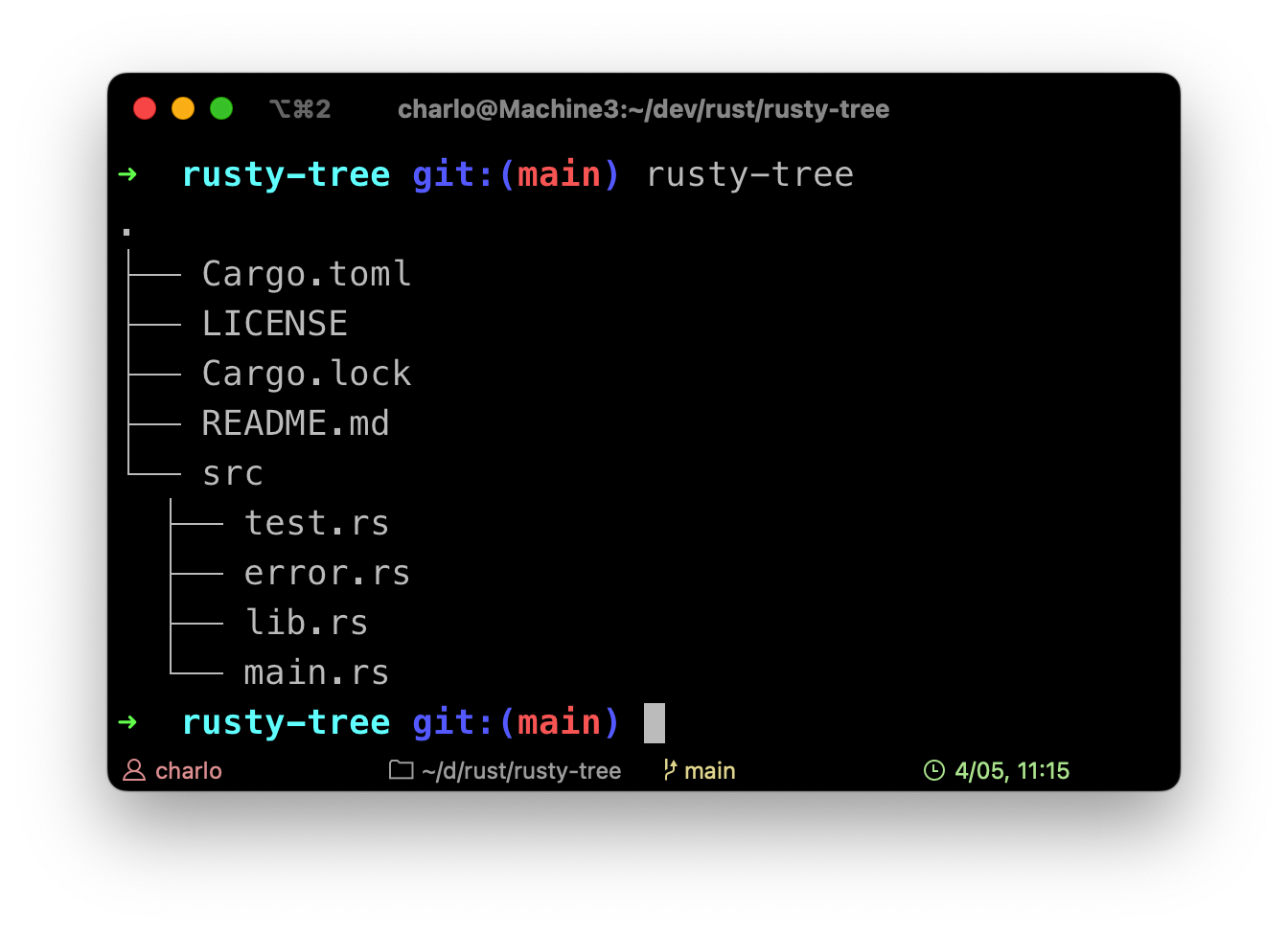
I created a command line program, rusty-tree, that lists the contents of the current directory. The complete source is on GitHub. When run, you'll get output similar to:
If you've worked with Swift, you'll have some headstart understanding Rust's syntax such as Result<T, E>, associated types, tuples, Option(al), let, mut(ating) struct, Self, references (&), and reference counting. Most concepts in Rust will be familiar but others are uniquely new. Two Rusty terms useful before proceeding:
Crate - is a compilation unit in Rust
Cargo - is the package manager for Rust
The Entry Point 🚪
...
fn main() {
    if let Err(e) = run() {
        eprintln!("Error: {e}");
        process:exit(1);
    }
}
The entry function, main(), for our program aka binary crate is short but packs a lot! It contains an if-control structure but with an unsual syntax for evaluating the condition. This is called pattern matching. The pattern is Err(e) and is matched against the return value of run(). If the value is an Err, bind the error it contains to a variable e then evaluate the code block.
The function run() returns an instance of an enum Result - either a success (Ok) or a failure (Err). This enumeration is generic over the types of data for either case as shown below:
enum Result<T, E> {
    Ok(T),
    Err(E)
}

// An example of a function definition that
// either returns a success value or an error
fn a_rust_function() -> Result<Success, Error> {
    ...
}
Note that run() returns a Result - a type alias defined as type Result<T = ()> = std::result::Result<T, RustyError>;
Back to main(). e is an instance of RustyError - a custom error type used in the program. Now to the fun part.
The Heart ❤️
The logic for our rusty-tree program is spread over two functions: run and list.
run()
pub fn run() -> Result {
    printer(String::from("."));

    let read_dir = env::current_dir()?.read_dir()?;
    list(read_dir, String::new())?;
    Ok(())
}
We start by printing a "." to denote the current directory. Next, from the process's environment, we grab the current directory and extract an iterator (ReadDir) for the directory's contents. We then call list(..) with this iterator and an empty prefix string.
The above function uses a nifty shortcut for propagating errors - the ? operator. Remember how errors are handled using Result in Rust? The ? operator unwraps the result of a function call, e.g. env::current_dir(), and if it is an Ok it returns the value inside Ok. If it is an Err, it performs an early return of the function in scope propagating the error Result to the caller.
list()
The listing algorithm is straightforward:
Given a directory, iterate over its contents
Print each entry found (skipping hidden entries)
If an entry is a directory, repeat these steps
fn list(read_dir: ReadDir, prefix: String) -> Result {
    let mut peekable = read_dir
        .filter(|entry| !is_hidden(entry))
        .peekable();

    ...

    Ok(())
}
In the list() function, we filter the entries in the iterator to exclude hidden files. Iterators in Rust are evaluated lazily hence the above snippet just sets up the 'operation pipeline' in preparation for the iteration.
Curious about
peekable()? Check out: Can I borrow the Moved Iterator?
fn list(read_dir: ReadDir, prefix: String) -> Result {
    ...
    while let Some(entry) = peekable.next() {
        ...
        printer(format!("{}{}{}", prefix, symbol.symbol, file_name));

        if file_type.is_dir() {
            let read_dir = entry.path().read_dir()?;
            let prefix = format!("{}{}", prefix, symbol.separator);
            list(read_dir, prefix)?;
        }
    }
    Ok(())
}
The next implementation is a while loop that iterates as long as peekable.next() yields Some(..) value; entry is bound to the value from the iterator. This is a similar pattern-matching syntax as discussed in the previous section.
In each iteration, we print the filename (along with its prefix) and then check if the current entry is a directory. If it is, entry.path().read_dir()? acquires an iterator for the entry's contents and recursively lists them.
When all entries are printed, list() returns an Ok(()) to signal success.
The Run 🏃🏾♂️
With the algorithm implemented, we can invoke cargo r to run the project:
$ cargo r
.
├── Cargo.toml
├── LICENSE
├── Cargo.lock
├── README.md
└── src
  ├── test.rs
  ├── error.rs
  ├── lib.rs
  └── main.rs
And to keep test coverage above zero 😀, cargo t yields all green ✅!
$ cargo t
...
running 3 tests
test test::test::create_filename_symbol ... ok
test test::test::create_last_filename_symbol ... ok
test test::test::extract_filename ... ok

test result: ok. 3 passed; 0 failed; 0 ignored; 0 measured; 0 filtered out; finished in 0.00s
Conclusion 🎬
Programs written in Rust are inspected for correctness at compile time by the borrow checker, type checking etc. For example, the Rust compiler will flag the creation of a dangling reference or prevent a data race when using "Safe Rust" - I tried it. I also found the compiler error reporting impressive with the formatting, concise messages, useful hints and error codes to explain an error, usually with an example e.g. default variable immutability.
Rust is fun, has a steep learning curve, a strict compiler, pleasant docs, unique language concepts, and a cool unofficial mascot. I am interested in it to write software for embedded DIY projects but obviously, it's resourceful for performing a variety of other development tasks.
So, when is the next SO developer survey? 😀
Happy coding!
About the author
Software Engineer
Comments
Join the discussionNo comments yet. Be the first to comment.


